
Clusters
Install compatible native runtimes, enroll two or more computers, and distribute checked CPU tasks with local threads inside each node.
ImplementedRun one checked Aner CPU task across two or more enrolled computers, with local worker threads inside each computer. Define the computation once with parallel.repeat and select parallel.cluster(...) as its execution policy. The coordinator assigns work, validates contributions and returns ordered numeric results; workers need only compatible Aner installations and the configured connection.
This guide describes the updated development runtime that implements native cluster repetitions. It does not assert that the latest published package includes this feature. The installed runtime builds must support the native process and SSH transport used here; successful local execution or an available package for a computer does not establish cluster support. Confirm each package's capability requirements before continuing.
The smallest useful cluster
Start with a coordinator and one other computer. The coordinator can contribute local threads or manage remote work only. Each enrolled worker has its own CPU allowance; different computers can use different thread counts.
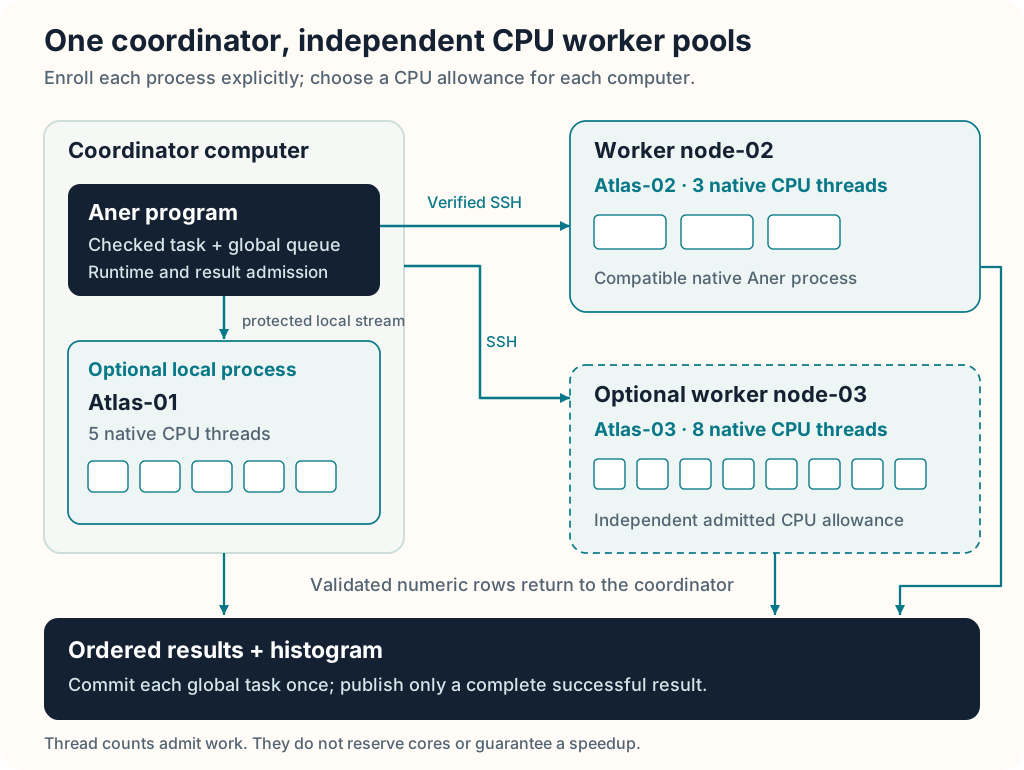
A configured worker is an Aner process. Its threads run tasks within its admitted CPU budget; they do not reserve physical cores. The operating system can time share or migrate threads. A coordinator that also computes needs resources for both control and local work.
1. Install compatible runtime packages
On every computer, install the full Aner package matching its operating system and processor architecture, including its launcher and supporting libraries. Use Downloads and the selected package's requirements. For this development feature, use compatible packages prepared from the same reviewed source revision. Keep the selected engines fixed during a run.
Run these commands on each computer:
aner --version
aner --binary
aner parallel inventory --json
Record the version, target, source_sha256 and effective_cpu_slots. The native cluster admission checks compatible version/contract fingerprints, random engine identity and addressed random probes. A fingerprint is a source contract, not a complete binary or numerical library identity. Preserve package provenance as well. The inventory alone is not a certification that a runtime build provides the required process/SSH transport.
Find the absolute full engine path on each node. This guide uses /opt/aner/bin/aner as a placeholder; replace it with each installation's actual path. Do not copy an executable for one processor architecture to a different architecture, or separate it from required package libraries. A matching editor extension does not update the runtime.
2. Prepare worker access
On each remote worker, enable its SSH server through that computer's documented service administration. Choose the account that will run Aner, allow the coordinator's connection through applicable network controls, and record the server's configured port. The coordinator needs an SSH client. A remote only job does not require an SSH server on the coordinator.
Use an existing appropriate authentication key or create a separate key on the coordinator:
ssh-keygen -t ed25519 -f ~/.ssh/id_ed25519_clusterDo not overwrite an existing key. Enroll the resulting public key for the worker account using the server's approved key enrollment procedure, commonly its authorized_keys file. The private key remains on the coordinator. For a passphrase protected key, make it available to the coordinator's SSH agent before starting the job:
ssh-add ~/.ssh/id_ed25519_clusterAdd these aliases to the coordinator's SSH client configuration, usually ~/.ssh/config. Replace every uppercase placeholder and use the actual identity path. The second alias is needed only when adding the third computer.
Host node-02
    HostName NODE_02_ADDRESS
    User WORKER_ACCOUNT
    IdentityFile ~/.ssh/id_ed25519_cluster
    IdentitiesOnly yes

Host node-03
    HostName NODE_03_ADDRESS
    User WORKER_ACCOUNT
    IdentityFile ~/.ssh/id_ed25519_cluster
    IdentitiesOnly yes
If the server uses a different port, add its Port setting to the corresponding alias. The cluster endpoint is the alias, not an address with a port suffix.
3. Verify connections before running work
Obtain each worker's SSH server public key fingerprint directly from its administrator or trusted local access. The key can be inspected with ssh-keygen -lf SERVER_PUBLIC_KEY_FILE, using its actual configured public key file. Connect interactively once from the coordinator and accept the host key only after comparing fingerprints:
ssh node-02Exit that session and confirm the connection works without prompting. Replace the example executable path:
ssh -T -o BatchMode=yes -o StrictHostKeyChecking=yes node-02 /opt/aner/bin/aner --version
ssh -T -o BatchMode=yes -o StrictHostKeyChecking=yes node-02 /opt/aner/bin/aner parallel inventory --json
Repeat for node-03 when enrolling it. Aner retains batch authentication and strict host key checks. Credentials, server fingerprints and addresses do not belong in the scientific source. Non interactive shell startup output must stay off stdout, which carries the native session protocol.
4. Create the private cluster file
Copy the example configuration to private.repeat.cluster in the project directory from which you will run Aner. Edit the paths and thread counts, then protect it:
cp examples/parallel/repeat_cluster.cluster.example private.repeat.cluster
chmod 600 private.repeat.cluster
For two computers, use:
ANER_CLUSTER 1
worker "Atlas-01" local "-" "/opt/aner/bin/aner" 5
worker "Atlas-02" ssh "node-02" "/opt/aner/bin/aner" 3
The fields are public worker identity, transport, endpoint, absolute Aner path and CPU thread allowance. Identities must be unique Atlas-NN names. Endpoints for local processes use "-"; SSH endpoints use the verified aliases. The configuration is an owner owned, owner only regular file. Keep it and private result reports out of version control; store authentication in SSH configuration and the agent.
To add a third computer after completing the same installation and connection checks, append:
worker "Atlas-03" ssh "node-03" "/opt/aner/bin/aner" 8To make the coordinator control work only, remove the local record. Configure as many threads as each node admits, rather than copying one count to every computer. The initial repetition implementation allows at most 32 processes and 256 aggregate CPU threads, with every node's effective allocation checked. Multiple local records share the coordinator's budget. Use one record per SSH target; multiple aliases must not be used to oversubscribe one physical host.
Remote executable paths accept portable letters, digits, underscore, dot, slash and hyphen. Use an absolute path without spaces or a literal ~. The configuration is the native ANER_CLUSTER 1 text schema; it is separate from neural device group configuration. Relative configuration paths resolve from the submitting command's working directory.
5. Run the complete Aner example
The downloadable repeat_cluster.aner is standalone. It counts seeded integer draws into ten bins, performs 1,000 draws per task and returns ten counts per block. Its execution policy declaration is:
let execution = parallel.cluster(config: "private.repeat.cluster")Run from the project root, using the updated compatible aner command:
aner check examples/parallel/repeat_cluster.aner --strict-declarations
aner run examples/parallel/repeat_cluster.aner --max-steps 100000000000
Checking validates source and task effects without reading the private file or contacting workers. The run then admits the configured engines and executes the job. If you saved the downloaded source in a different folder, adjust the source path while keeping the configuration relative to your working directory.
The default is 100,000 draws, seed 20261019, and verify = true. It compares every block/bin cell against the same task running through a local one worker executor. A successful run prints the verification message, Completed draws: 100000, ten counts summing to 100,000, and the native summary. This checks full block result parity; it does not retain every raw draw. There must be at least one task per selected worker process.
For a local reference, replace the single policy declaration with parallel.local(workers: 1) or an admitted larger count. For a larger experiment, change draw_count to 100_000_000. After validating a small case, set verify = false for timing; verification repeats the complete workload serially. Keep both seed and global draw identities unchanged across comparisons.
What the runtime distributes
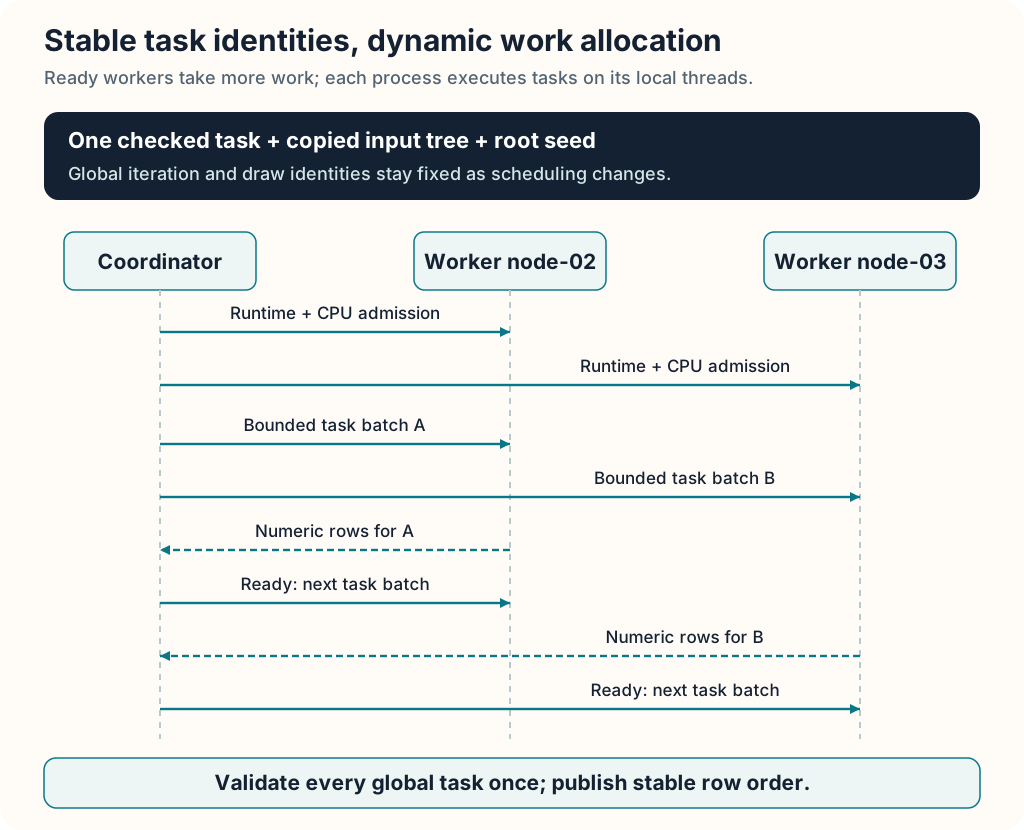
Aner ships only the checked task and its reachable named helper declarations, plus admitted copied parameters. It does not replay the original script's top level setup on workers, deploy files manually or open a worker discovery listener. Each process retains a native session and runs its assigned tasks on bounded local threads.
One initial task establishes participation and output width on every selected process. Further bounded batches go to ready processes; faster computers can complete a larger share. Scheduling preserves the original global iteration index and derived task seed. In this example a draw uses block * block_size + offset with the fixed root seed, so machine and thread allocation do not change its identity. Cross platform transcendental calculations can still need stated numerical tolerances; seed identity alone does not guarantee every arithmetic operation is bitwise portable.
Results are ordered numeric rows in SimulationResults. At 100 million draws, 1,000 draw blocks produce 100,000 ten column rows: approximately 8 MB of Float64 data plus bookkeeping, within the example's 64 MiB result budget. No 100 million element random array is retained. A future explicit reduction API could further reduce retained block storage.
Read the summary and limits
Cluster summaries report backend: "native-cpu-cluster", admitted thread workers, completed iterations, timing, managed storage and a nodes array. Each node includes its public identity, target, CPU slots, completed iterations/tasks, compute seconds and observed local task peak. Those counts are function invocations, not the inner random draws. Confirm every selected process contributed.
Global peak_active_scope: "node-requests" means the peak counts simultaneous node requests, not CPU utilization or active remote tasks. Node peaks and local summaries refer to task calls. Cluster seconds includes connection, admission, work and worker teardown; summed node compute times have a different boundary. Measure full command elapsed time for comparisons as well.
| Initial contract | Limit or behavior |
|---|---|
| Repetition results | 1..1,000,000 tasks; 1..4,096 finite numeric columns; exact integer to Float64 storage |
| Remote parameters | Numeric values, Bool, String and nested List trees; no shared aliases, cycles, input arrays or runtime objects |
| Task graph | Checked top level tasks/helpers; no nominal class dependencies, globals, unrestricted closures, I/O or nested parallel calls; task local arrays are supported |
| Source/transport | Parameters up to 512 KiB and 64 nesting levels; declarations up to 768 KiB; each generated request and each response at most 1 MiB |
| Work guards | One million step remote task/cell ceiling and fixed 120 second operation deadlines; the submitter's larger CLI budget does not raise the remote ceiling |
| Failure | Any incompatible engine, task, invalid result, timeout or lost transport aborts the group; no successful partial result, retry, resume or coordinator failover |
The coordinator and workers must remain running, awake and reachable. Keep tasks bounded enough for the remote guards. Full local snapshot support is broader than the initial remote parameter codec; see the repetition reference for exact admission rules.
Resolve only the dependency that failed
Ordinary local execution and all local clusters perform no SSH dependency check. For an explicitly selected SSH transport, recognized startup failures can explain a missing coordinator client, refused connection, authentication, host key, reachability, worker executable or library problem. A refused connection does not prove an SSH server package is absent: first check the worker's configured port, service state and network controls, then install or enable a service only through its documented administration if needed.
Authentication requires fixing account/key/agent enrollment; host key failures require trusted fingerprint verification; reachability requires checking the alias, network and port. These are distinct from a missing service. Worker loader errors require the correct complete Aner package and documented libraries. Aner does not auto install dependencies or print raw captured stderr. If the main executable cannot start because its loader fails, its own code cannot emit a hint; an already running coordinator can explain recognized worker startup failures.
Evaluate scaling and plan accelerator work separately
Thread counts do not predict speedup. Measure each computer alone with its selected workers and then the combined plan, keeping count, seed, task and runtime provenance fixed. Use repeated trials and compare median full command times and spread. For measured node rates r_i, an optimistic estimate is N / sum(r_i) plus connection, scheduling, transport and final batch costs. Serial work, limited task count, shared memory bandwidth and network latency can dominate; a second computer can make a small job slower.
This guide executes CPU tasks. Selecting a cluster does not convert a source loop into an accelerator kernel or pool device memory. Supported distributed model training has its own replica contract. A future accelerator version of this histogram needs a native batched random/count kernel, device capability checks, a deterministic random stream contract, precision validation and measured transfer/launch costs. Keep that as a separate validated execution path.
See native parallel computing and the complete repetition API for the shared execution and result contracts. This guide and its public example contain placeholders only; no credentials, enrolled endpoints or private configuration are supplied.